
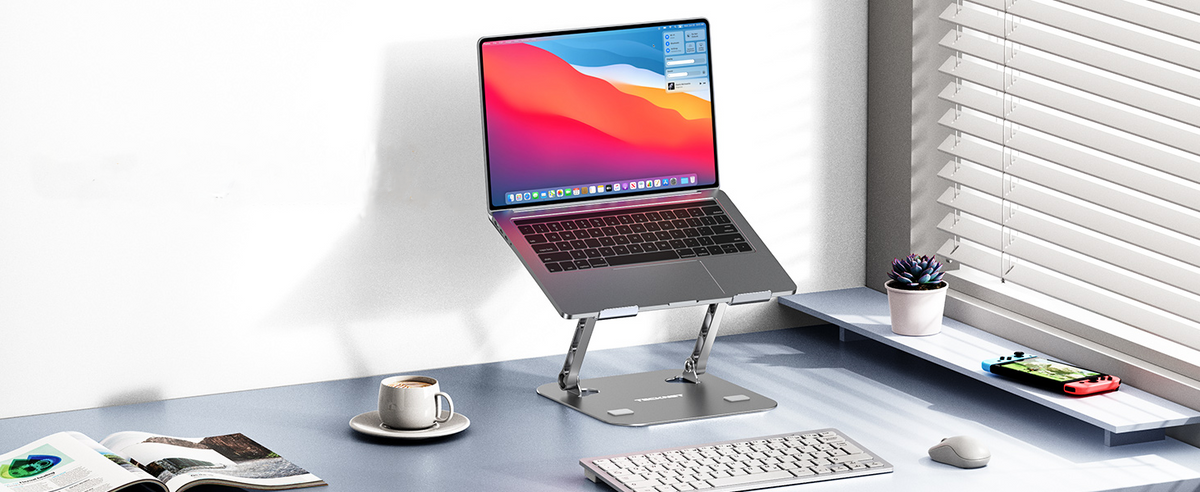
A laptop is convenient because you can work almost anywhere. But when you use one at a desk for several hours, placing it directly on the desk may not provide the most comfortable viewing position.
A laptop stand can raise your screen, create more usable desk space, improve airflow underneath your laptop, and help you build a more comfortable workstation.
But not every laptop stand is designed for the same purpose.
Some are built for ergonomic height adjustment. Some are designed to rotate 360 degrees. Others hold your laptop vertically to save desk space. There are also portable and foldable models designed for people who move between home, office, and travel.
So, what is the best laptop stand for your setup?
This guide explains the main types of laptop stands, what to look for, and how to choose the right one for your needs.
What Is a Laptop Stand?
A laptop stand is a desktop accessory that elevates or holds a laptop above the surface of your desk.
Depending on the design, a laptop stand can:
- Raise your laptop screen
- Adjust the viewing angle
- Improve desk organization
- Create more space underneath your laptop
- Improve airflow around the device
- Hold your laptop vertically
- Rotate your laptop for easier screen sharing
- Provide a more comfortable workstation setup
The popularity of laptop stands has grown alongside home offices, hybrid work, and multi-device desk setups. Current keyword data also shows strong demand around broad terms such as laptop stand, as well as more specific searches such as laptop stand for desk and adjustable laptop stand. MerchantWords
Why Use a Laptop Stand?
1. Raise Your Laptop Screen
One of the main reasons people buy a laptop stand is to raise the screen.
Instead of keeping the display low on your desk, an adjustable stand can elevate it to a more comfortable viewing height.
This can be particularly useful if you spend hours working, studying, browsing, or attending video meetings.
A laptop stand doesn't replace an ergonomic workstation by itself, but it can be an important part of creating a better desk setup.
2. Create a More Organized Desk
A laptop stand can help separate your laptop from the rest of your workspace.
You can place a keyboard and mouse in front of the laptop while keeping the screen elevated.
This setup is particularly useful if you frequently connect your laptop to an external monitor or use your laptop as a secondary display.
For a cleaner workstation, a vertical laptop stand can take the idea even further by storing a closed laptop upright rather than flat on the desk.
3. Improve Airflow Around Your Laptop
Many laptop stands use an open design that leaves space underneath the device.
This can help provide additional airflow around the bottom of the laptop, particularly compared with placing the laptop directly on a flat surface.
For laptops with bottom ventilation, a stand with an open platform can be especially useful.
However, a laptop stand should not be considered a replacement for an active cooling pad when additional fan-assisted cooling is required.
Laptop Stand vs. Laptop Riser
You may see the terms laptop stand, laptop riser, and laptop holder used interchangeably.
In most cases, they describe similar products, but the designs can be different.
A laptop riser typically focuses on raising the screen to a higher position.
A laptop stand can provide additional features such as:
- Height adjustment
- Angle adjustment
- 360° rotation
- Foldability
- Vertical storage
- Adjustable width
- Aluminum construction
If your main goal is simply to raise the screen, a basic laptop riser may be enough.
If you want more flexibility, look for an adjustable laptop stand.
Types of Laptop Stands
Choosing the right type is often easier once you understand what each design is intended to do.
1. Adjustable Laptop Stand
An adjustable laptop stand allows you to change the height, angle, or both.
This is one of the most versatile options for home offices and professional workspaces.
You can adjust the screen position based on:
- Your desk height
- Your chair height
- Whether you're sitting or standing
- Whether you're using an external keyboard
- Whether you're working alone or sharing your screen
If you use your laptop for several hours a day, adjustability can be more valuable than simply choosing the cheapest stand.
2. Rotating Laptop Stand
A rotating laptop stand adds another useful feature: the ability to turn the laptop without lifting the entire stand.
This can be useful when:
- Sharing your screen with coworkers
- Showing something to a client
- Collaborating with someone across the desk
- Switching between different viewing positions
The TECKNET TK-LS002 features a 360° rotating base, allowing you to turn the laptop toward another person while keeping the stand in place. It also supports height and tilt adjustment and can hold devices up to 17.3 inches. TECKNET
TECKNET 360° Rotating Laptop Stand
The TECKNET TK-LS002 combines several features that are useful for a home office or professional desk:
- 360° rotating base
- Adjustable height and tilt
- Aluminum alloy construction
- Supports devices up to 17.3 inches
- Up to 22 lb load capacity
- Foldable design
- Open platform for airflow
- Anti-slip silicone protection
The stand folds down to approximately 10.2 × 8.7 × 1.25 inches for storage or travel. TECKNET
Best for:
Home offices, professionals, meetings, screen sharing, and multi-purpose desk setups.
Shop TECKNET 360° Rotating Laptop Stand
3. Vertical Laptop Stand
A vertical laptop stand holds your laptop upright instead of laying it flat.
This design is especially useful when you primarily use your laptop with:
- An external monitor
- External keyboard
- External mouse
- USB-C dock
- Desktop accessories
Instead of taking up a large portion of your desk, the closed laptop can stand vertically in a much smaller footprint.
This can help create a cleaner and more organized workstation.
Keyword data also shows specific demand for vertical laptop stand and vertical laptop stand for desk, making this a valuable long-tail topic within the broader laptop stand category. MerchantWords
TECKNET Adjustable Aluminum Vertical Laptop Stand
The TECKNET TK-VT001 is designed specifically for vertical laptop storage.
Its adjustable slot width ranges from 0.59 to 1.3 inches, allowing it to accommodate laptops and notebooks up to 17.3 inches, depending on device thickness. TECKNET
The aluminum alloy construction provides a stable base, while silicone padding helps protect the laptop from scratches and slipping.
It can also help free up valuable desk space by keeping your laptop upright. TECKNET
Best for:
- Closed-lid laptop setups
- External monitor users
- Home offices
- Small desks
- Minimalist workstations
- MacBook setups
- Multi-device desks
Shop TECKNET Vertical Laptop Stand
4. Portable Laptop Stand
If you regularly work from different locations, a portable laptop stand can be more practical than a large desktop model.
Portable stands are typically designed to:
- Fold flat
- Take up less space
- Fit inside a backpack
- Set up quickly
- Work with different desks
Current keyword data shows continued demand for portable and foldable laptop stands, especially around terms such as portable laptop stand, portable adjustable laptop stand, and foldable laptop stand. MerchantWords
If portability is important, check both the folded dimensions and the weight of the stand before buying.
5. Foldable Laptop Stand
A foldable laptop stand is useful for users who want the benefits of an adjustable stand without permanently occupying desk space.
A foldable model can be stored in:
- A desk drawer
- Backpack
- Laptop bag
- Carry-on luggage
It's particularly useful for hybrid workers who move between home and office.
The TECKNET TK-LS002 combines height and tilt adjustment with a foldable design, making it suitable for both fixed desks and occasional travel. TECKNET
What to Look for in a Laptop Stand
Before buying a laptop stand, consider these important features.
1. Laptop Size Compatibility
Always check the supported laptop size.
Common laptop sizes include:
- 13-inch
- 14-inch
- 15.6-inch
- 16-inch
- 17-inch
- 17.3-inch
A stand designed for larger laptops should also provide enough support for the device's weight.
For example, TECKNET's TK-LS002 supports devices up to 17.3 inches and up to 22 lb. TECKNET
2. Height Adjustment
If ergonomics are important to you, choose a height-adjustable laptop stand.
Being able to change the screen height gives you more flexibility to create a setup that works with your desk and chair.
A fixed-angle stand may be suitable for simple setups, but adjustable stands provide more room to customize your workspace.
3. Angle Adjustment
Height isn't the only factor.
An adjustable viewing angle can help you position the display more comfortably depending on how you're sitting.
If you frequently switch between typing directly on the laptop and using an external keyboard, angle adjustment can also make your setup more flexible.
4. 360° Rotation
If you regularly collaborate with coworkers or clients, a rotating base can be particularly useful.
Instead of physically moving the laptop stand, you can rotate the laptop toward another person.
This is one of the key differences between a standard laptop stand for desk and a rotating laptop stand.
5. Stability
A good laptop stand should remain stable while supporting your device.
Look for:
- Wide or reinforced support structures
- Non-slip feet
- Silicone padding
- Strong hinges
- Solid materials
- A suitable weight capacity
This is especially important for large laptops.
6. Material
Aluminum is a popular choice for laptop stands because it can provide a combination of:
- Strength
- Stability
- Durability
- Premium appearance
- Heat dissipation
TECKNET's laptop stands use aluminum alloy construction across its adjustable and vertical models. TECKNET
How to Choose the Right Laptop Stand for Your Setup
Not sure which type you need?
Start with your workspace.
For a Home Office
Choose an adjustable laptop stand that allows you to customize height and viewing angle.
If you frequently share your screen, a 360° rotating model can be especially useful.
For a Small Desk
A vertical laptop stand can free up desk space by storing your laptop upright.
For Hybrid Work
Choose a foldable or portable laptop stand that can easily move between locations.
For External Monitor Users
A vertical stand is ideal if your laptop usually stays closed while connected to an external display.
For Collaborative Work
A 360° rotating laptop stand makes it easier to share your screen without moving the entire setup.
For a Minimalist Desk
Choose an aluminum stand with a compact footprint and clean design.
Laptop Stand vs. Vertical Laptop Stand
These two products solve different problems.
| Feature | Adjustable Laptop Stand | Vertical Laptop Stand |
|---|---|---|
| Raises screen | ✓ | No |
| Adjustable height | ✓ | Usually no |
| Adjustable angle | ✓ | No |
| 360° rotation | Some models | No |
| Holds laptop upright | No | ✓ |
| Saves desk space | Moderate | Excellent |
| External monitor setup | Good | Excellent |
| Direct laptop use | Excellent | Limited |
| Closed-laptop setup | Possible | Ideal |
If you primarily use your laptop screen, choose an adjustable laptop stand.
If your laptop is usually connected to an external monitor, a vertical laptop stand may be the better choice.
The TECKNET Laptop Stand Lineup
TECKNET offers different laptop stand designs for different desk setups.
TECKNET TK-LS002 — 360° Rotating Laptop Stand
Best for: Adjustable desk setups and collaboration.
Key features include:
- 360° rotating base
- Height and tilt adjustment
- Up to 17.3-inch devices
- Up to 22 lb capacity
- Aluminum alloy construction
- Foldable design
- Ventilated open platform TECKNET
TECKNET TK-VT001 — Vertical Laptop Stand
Best for: Saving desk space and external-monitor setups.
Key features include:
- Adjustable width
- 0.59–1.3-inch supported thickness
- Up to 17.3-inch laptops
- Aluminum alloy construction
- Anti-scratch silicone protection
- Compact vertical design TECKNET
TECKNET TK-LS005 — Adjustable Aluminum Laptop Stand
Best for: Users looking for a compact adjustable laptop stand.
The TECKNET TK-LS005 is designed around adjustable height and viewing angles, with a foldable aluminum construction. It's a good option for users who want a traditional laptop riser format with more flexibility than a fixed-angle stand. TECKNET
Does a Laptop Stand Help With Cooling?
It can help improve airflow around the laptop, particularly when the stand raises the laptop and leaves space underneath it.
An open laptop stand allows air to circulate around the bottom of the device rather than keeping it directly against the desk.
However, if your primary concern is laptop temperature during gaming or heavy workloads, an active laptop cooling pad with built-in fans is a more appropriate solution.
A passive laptop stand and an active laptop cooling pad serve different purposes:
Laptop stand:
Elevation + ergonomics + organization
Laptop cooling pad:
Active airflow + cooling + elevation
How to Build a Better Laptop Desk Setup
A laptop stand works best when combined with the right accessories.
A simple setup might include:
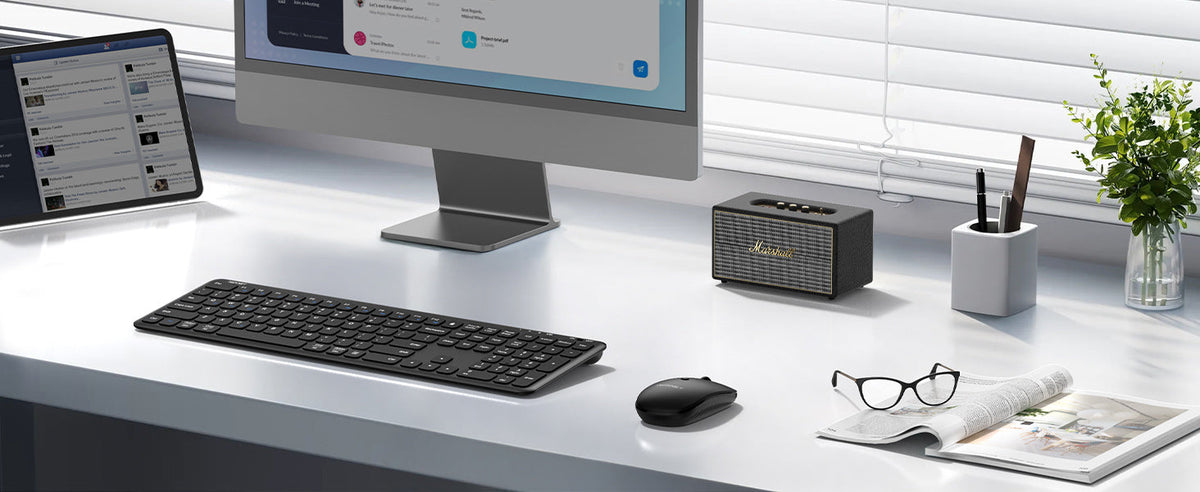
Laptop stand + external keyboard + wireless mouse + monitor
This allows you to raise the laptop display while keeping your keyboard and mouse at a more convenient position on the desk.
You can also add:
- Laptop cooling pad
- Monitor
- USB-C hub
- Wireless headset
- Desk mat
- Webcam
- External speakers
For users working from home, these accessories can turn a basic laptop into a more organized workstation.
Frequently Asked Questions About Laptop Stands
Is a laptop stand worth it?
For people who regularly use a laptop at a desk, a stand can be worthwhile if you want to raise the display, improve desk organization, or create a more flexible workstation.
The value depends on your usage. If you mostly use your laptop on the go, portability may matter more than advanced adjustment.
What is the best height for a laptop stand?
There isn't one universal height because desk and chair setups vary. An adjustable stand allows you to position the screen based on your workspace and viewing preference.
Are aluminum laptop stands good?
Aluminum is a popular material because it can provide a strong, stable structure while maintaining a relatively clean and lightweight design. Aluminum can also help conduct heat away from the laptop's base.
Is a vertical laptop stand good for MacBook?
A vertical laptop stand can be useful for MacBook users who primarily connect their laptop to an external monitor, keyboard, and mouse.
Always check the stand's adjustable width and supported device thickness before purchasing.
Can a laptop stand improve posture?
A laptop stand can help you position the screen higher, which may make it easier to create a more comfortable workstation. However, the stand itself does not guarantee good posture. Your chair, keyboard, mouse, screen position, and overall desk setup also matter.
Can a laptop stand help with overheating?
An open laptop stand can improve clearance and airflow around the laptop. However, if your laptop requires active cooling during demanding workloads, a dedicated laptop cooling pad is more appropriate.
Find the Right Laptop Stand for Your Desk
The best laptop stand isn't necessarily the one with the most features. It is the one that fits your laptop, workspace, and daily routine.
For an adjustable setup with easy screen sharing, the TECKNET TK-LS002 360° rotating laptop stand provides height and tilt adjustment, a rotating base, and a sturdy aluminum design. TECKNET
For users who want to save desk space, the TECKNET TK-VT001 vertical laptop stand keeps a laptop upright while providing adjustable width and a compact footprint. TECKNET
And for users who want a traditional adjustable laptop riser, the TECKNET TK-LS005 offers an aluminum design with adjustable height and angle. TECKNET
Whether you're building a home office, upgrading a gaming setup, or simply trying to create a cleaner desk, choosing the right adjustable laptop stand, vertical laptop stand, or laptop stand for desk can make your workspace more flexible and organized.


Leave a comment
This site is protected by hCaptcha and the hCaptcha Privacy Policy and Terms of Service apply.