

Laptop Cooling Pads: What They Do and How to Choose the Right One
Whether you're working with dozens of browser tabs, editing videos, streaming, or playing demanding games, your laptop can generate a significant amount of heat.
A laptop's built-in cooling system is designed to manage normal workloads, but sustained CPU and GPU activity can make the chassis noticeably warm. In some situations, restricted airflow or high temperatures can also contribute to reduced performance.
That's where a laptop cooling pad can help.
A laptop cooling pad combines active airflow with an elevated stand to improve ventilation underneath your laptop. Depending on the design, a cooling pad can also provide adjustable height, USB connectivity, and a more comfortable viewing angle.
But do laptop cooling pads actually work? And what should you look for when choosing a laptop cooler?
Let's take a closer look.
What Is a Laptop Cooling Pad?
A laptop cooling pad is an external stand equipped with one or more fans that sits underneath your laptop.
The fans move air around the bottom of the laptop while the stand raises the device above the desk surface. This can help improve airflow around the laptop's intake vents.
Different laptop cooling pads use different designs:
- Single large fan cooling pads
- Dual-fan laptop coolers
- Multi-fan cooling pads
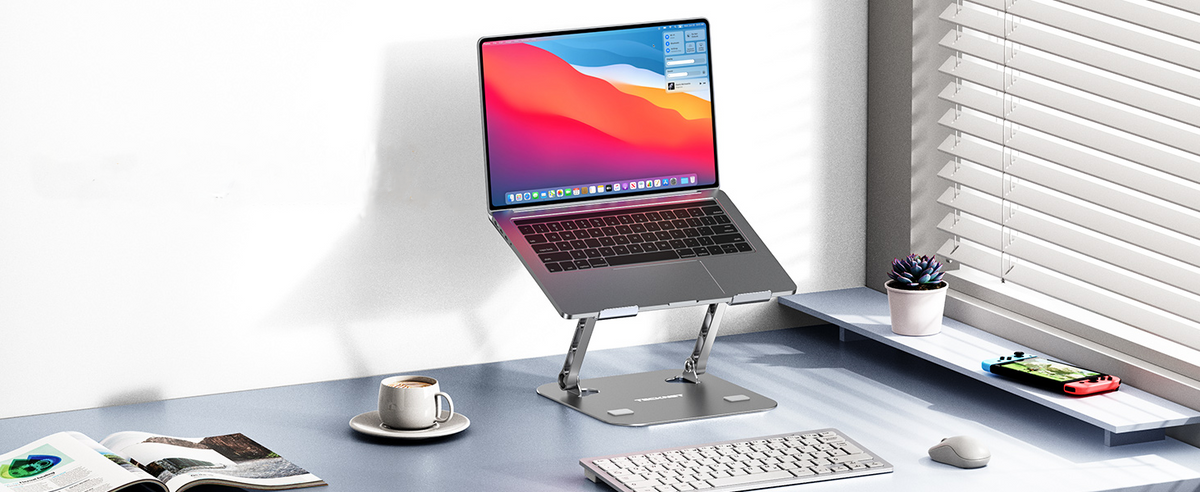
- Adjustable laptop cooling stands
- Portable laptop coolers
- Gaming laptop cooling pads
- Cooling pads with USB passthrough
- Cooling stands with additional device holders
The right choice depends on your laptop's size, ventilation design, workload, and how you plan to use it.
Do Laptop Cooling Pads Actually Work?
Yes, but the results depend on the laptop and the cooling pad design.
A cooling pad doesn't automatically make every laptop dramatically cooler. Its effectiveness depends on factors such as the location of your laptop's intake vents, internal cooling system, workload, room temperature, and the airflow produced by the cooling pad.
Recent testing and reviews also emphasize that there isn't one universally best cooling pad. Gaming laptops under sustained heavy loads can benefit from stronger active cooling, while a lightly loaded office laptop may benefit more from simple elevation and quieter airflow. iTechGuides
For example, a laptop with large bottom intake vents may benefit more from a fan positioned directly underneath those vents. If a laptop's primary intake is located somewhere else, the cooling effect can be more limited.
The key is to match the cooling pad to your laptop—not simply choose the model with the most fans.
Why Use a Laptop Cooling Pad?
1. Improve Airflow Around Your Laptop
When a laptop sits completely flat on a desk, its bottom panel is close to the surface.
A cooling stand raises the laptop and creates additional space underneath it. Built-in fans can then provide additional airflow.
This is particularly useful for laptops that have ventilation openings on the bottom.
2. Help Manage Heat During Long Work Sessions
Long periods of gaming, video editing, 3D rendering, or other demanding workloads can keep a laptop's CPU and GPU busy for extended periods.
A laptop cooling fan can provide additional airflow during these sustained workloads.
However, a cooling pad should be considered part of your laptop's overall cooling setup rather than a replacement for the laptop's internal cooling system.
3. Create a More Comfortable Viewing Angle
A good laptop cooling stand does more than move air.
Raising your laptop screen can create a more comfortable viewing position for extended work sessions. Adjustable cooling pads allow you to change the height or angle depending on your desk setup.
This makes a cooling pad useful for both work and gaming.
Laptop Cooling Pad vs. Laptop Stand
If you're comparing a standard laptop stand with a cooling pad, the biggest difference is active airflow.
A traditional laptop stand primarily raises the laptop and improves clearance underneath it.
A cooling pad does the same thing while adding one or more fans.
| Feature | Laptop Stand | Laptop Cooling Pad |
|---|---|---|
| Raises laptop | ✓ | ✓ |
| Improves clearance | ✓ | ✓ |
| Built-in fans | Usually no | ✓ |
| Active airflow | No | ✓ |
| Cooling during heavy workloads | Limited | Better suited |
| Adjustable viewing angle | Often | Often |
| USB connection | Usually no | Common |
If your laptop simply needs a better viewing angle, a regular stand may be enough.
If your laptop gets noticeably warm during extended workloads, a cooling pad for laptop can provide an additional layer of airflow.
What to Look for in a Laptop Cooling Pad
Not all cooling pads are designed for the same purpose. Here are the most important factors to consider.
1. Laptop Size Compatibility
Always check the supported laptop size before buying.
Common sizes include:
- 12-inch laptops
- 13-inch laptops
- 14-inch laptops
- 15.6-inch laptops
- 16-inch laptops
- 17-inch laptops
For example, the TECKNET N8 supports laptops from 12 to 17 inches, while the N5 is designed for 12- to 16-inch laptops. TECKNET
A properly sized cooling pad provides better support and helps keep the laptop securely positioned over the fans.
2. Number and Size of Fans
More fans don't necessarily mean better cooling.
The location and size of the fans matter because airflow needs to reach the laptop's intake vents.
A dual-fan design can be effective for everyday laptops, while a multi-fan design can provide broader airflow across the bottom of the laptop.
For example, the TECKNET N5 uses two 110mm fans, while the TECKNET N8 uses three 110mm fans at up to 1200 RPM. TECKNET
3. Fan Speed and Airflow
Fan speed is commonly measured in RPM, or revolutions per minute.
Higher RPM can mean the fan is capable of moving air faster, but maximum RPM isn't the only factor that determines cooling performance.
Airflow direction, fan size, vent alignment, and the laptop's internal cooling design all matter.
For everyday use, adjustable fan speed can be particularly useful because you can balance cooling performance and noise.
4. Noise Level
A powerful fan can produce more noise at higher speeds.
If you're using your laptop in an office, bedroom, library, or shared space, noise may be just as important as cooling performance.
That's why an adjustable laptop cooler can be useful. You can increase fan speed during gaming or demanding workloads and reduce it during browsing, writing, or video streaming.
The TECKNET N5, for example, uses a side dial that allows you to adjust the fan speed according to your needs. TECKNET
5. Adjustable Height
A cooling pad should not only help cool your laptop—it should also fit your workspace.
Multiple height settings allow you to adjust the screen position for different desks, chairs, and working styles.
The TECKNET N8 provides two adjustable height settings, while the TECKNET F9 cooling pad offers five height levels, raising the laptop up to 6 inches and tilting it up to 34°. TECKNET
6. USB Ports
Most laptop cooling pads use USB power.
If your cooling pad takes up one USB port, a USB passthrough port can be useful for connecting another device such as a mouse, keyboard, or headset.
The TECKNET N8 features two USB ports, with one used to power the cooling pad and another available for peripherals. TECKNET
The F9 also includes two USB ports, allowing you to keep another accessory connected while using the cooling pad. TECKNET
Best Laptop Cooling Pads for Different Needs
There isn't one best laptop cooling pad for everyone.
The ideal model depends on your laptop size and how you use your computer.
Best for Everyday Work: TECKNET N5 Laptop Cooling Pad
If you want a compact and portable laptop cooler for everyday use, the TECKNET N5 is a practical option.
It features:
- Two 110mm fans
- Adjustable fan speed
- Metal mesh surface
- USB-C and USB-A connectivity
- Support for 12–16-inch laptops
- Slim, lightweight design
- Portable profile for desks, sofas, and other setups
Its targeted airflow design directs air toward the central CPU area, making it suitable for everyday work, studying, browsing, and moderate gaming. TECKNET
Shop TECKNET N5 Laptop Cooling Pad
Best Multi-Fan Laptop Cooler: TECKNET N8
For users who want broader airflow, the TECKNET N8 features three 110mm fans running at up to 1200 RPM.
It supports laptops from 12 to 17 inches and includes two height settings and dual USB ports.
The rubberized surface and base help keep your laptop stable while you work or play. TECKNET
This makes the N8 a good choice for:
- Office laptops
- Gaming laptops
- Large-screen laptops
- Long work sessions
- Home office setups
Shop TECKNET N8 Laptop Cooling Pad
Best High-Airflow Option: TECKNET F9 Laptop Cooling Pad
For users looking for a more powerful gaming laptop cooling pad, the TECKNET F9 uses nine fans with speed control up to 2600 RPM.
Its 360° airflow design is intended to distribute airflow across the laptop, while the five-level height adjustment allows you to customize the viewing angle. TECKNET
The F9 supports laptops from 12 to 15.6 inches and also includes dual USB ports.
It's particularly suitable for users who want to combine:
- Active laptop cooling
- Ergonomic positioning
- Gaming
- Long work sessions
- Multi-device desk setups
Shop TECKNET Laptop Cooling Pad with Phone Stand
How to Use a Laptop Cooling Pad Effectively
Buying a cooling pad is only part of the solution. Proper placement also matters.
Keep the Laptop's Air Vents Unblocked
Before placing your laptop on a cooling pad, identify where its intake vents are located.
Make sure the cooling pad doesn't accidentally block them.
Place Your Laptop Correctly
Center the laptop on the cooling pad so that the fans are positioned underneath the areas where your laptop draws air.
This can help maximize the benefit of the additional airflow.
Keep the Cooling Pad Clean
Dust can accumulate on fans and ventilation openings over time.
Clean the cooling pad regularly using an appropriate soft cloth or compressed air according to the manufacturer's recommendations.
Don't Use Your Laptop on Soft Surfaces
Beds, blankets, pillows, and couches can restrict airflow around the bottom of a laptop.
For demanding tasks, use your laptop on a stable, flat surface whenever possible.
A cooling pad can help create additional clearance, but it shouldn't be used as a substitute for proper ventilation.
Can a Laptop Cooling Pad Improve Gaming Performance?
It can help maintain performance when heat is limiting the laptop, but it won't automatically increase FPS on every laptop.
Gaming laptops can generate substantial heat because the CPU and GPU may operate at high utilization for extended periods. Current cooling-pad testing emphasizes that the biggest potential benefit comes when a laptop is actually thermally constrained. iTechGuides
If your laptop isn't overheating or thermal throttling, adding a cooling pad may have a smaller effect on gaming performance.
For gamers, therefore, the goal shouldn't simply be:
"Get the laptop as cold as possible."
Instead, the goal is:
"Help the laptop maintain stable temperatures and performance during sustained workloads."
Are Laptop Cooling Pads Good for Gaming Laptops?
Yes, gaming laptop cooling pads can be useful, particularly during long gaming sessions.
Gaming laptops typically generate more heat than lightweight laptops because their processors and graphics hardware can consume significantly more power under load.
However, different gaming laptops have different vent layouts.
Before purchasing a cooling pad, check:
- Where the laptop's intake vents are located
- Your laptop's screen size
- The cooling pad's fan placement
- Whether the pad supports your laptop's weight
- The maximum fan speed
- Noise levels
- Available height adjustments
A cooling pad with many fans isn't automatically better if the airflow doesn't align with your laptop's intake vents.
Laptop Cooling Pad Buying Guide
Here's a simple way to choose:
| Your Need | What to Look For |
|---|---|
| Everyday office work | Quiet fans + ergonomic stand |
| Student laptop | Lightweight + portable |
| Gaming | Strong airflow + adjustable fan speed |
| Long gaming sessions | Multi-fan or high-airflow design |
| Large laptop | 16–17 inch compatibility |
| Small laptop | Compact 12–14 inch support |
| Quiet workspace | Low-noise adjustable fans |
| Better posture | Multiple height settings |
| Desk with accessories | USB passthrough |
| Portable setup | Slim and lightweight design |
Frequently Asked Questions About Laptop Cooling Pads
Do laptop cooling pads really cool laptops?
They can help improve airflow and reduce heat in some laptop setups. Results vary depending on the laptop's vent placement, internal cooling system, workload, and cooling pad design. TechRadar
Is a laptop cooler worth it?
A laptop cooler can be worthwhile if your laptop becomes hot during gaming or sustained workloads, or if you want an elevated ergonomic setup with additional airflow.
If your laptop remains cool under your normal workload, you may not see a significant performance benefit.
Can I use a cooling pad for a gaming laptop?
Yes. Gaming laptops are one of the common use cases for cooling pads because they can operate under sustained CPU and GPU loads. Choose a model that matches your laptop's size and bottom ventilation.
How many fans should a laptop cooling pad have?
There is no universal number. A two-fan cooling pad can be effective for some laptops, while a multi-fan model may provide broader airflow. Fan placement and alignment with the laptop's vents are more important than simply counting fans.
Does a cooling pad increase FPS?
Not necessarily. A cooling pad is more likely to help gaming performance when your laptop is reducing CPU or GPU performance because of heat. It isn't a guaranteed FPS upgrade.
Can I use a laptop cooling pad with a MacBook?
It depends on the cooling pad and the MacBook's ventilation design. Always check the product's size and compatibility requirements before purchasing. TECKNET's N5 supports 12–16-inch laptops and lists MacBook among its compatible devices. TECKNET
Keep Your Laptop Cooler and Your Workspace More Comfortable
A laptop cooling pad can be more than just a fan underneath your computer. The right cooling stand can combine active airflow, ergonomic positioning, USB connectivity, and better desk organization.
For a compact everyday solution, the TECKNET N5 offers dual-fan cooling and a portable design. For broader airflow across larger laptops, the TECKNET N8 combines three fans with adjustable height and dual USB ports. For users who want more powerful multi-fan cooling and extensive height adjustment, the TECKNET F9 provides nine fans, up to 2600 RPM, and 360° airflow. TECKNET
The most important thing is to choose a cooling pad that matches your laptop size, airflow design, workload, and workspace. With the right setup, a laptop cooler can help create a more comfortable and better-organized workstation for work, gaming, and everyday use.


Leave a comment
This site is protected by hCaptcha and the hCaptcha Privacy Policy and Terms of Service apply.