
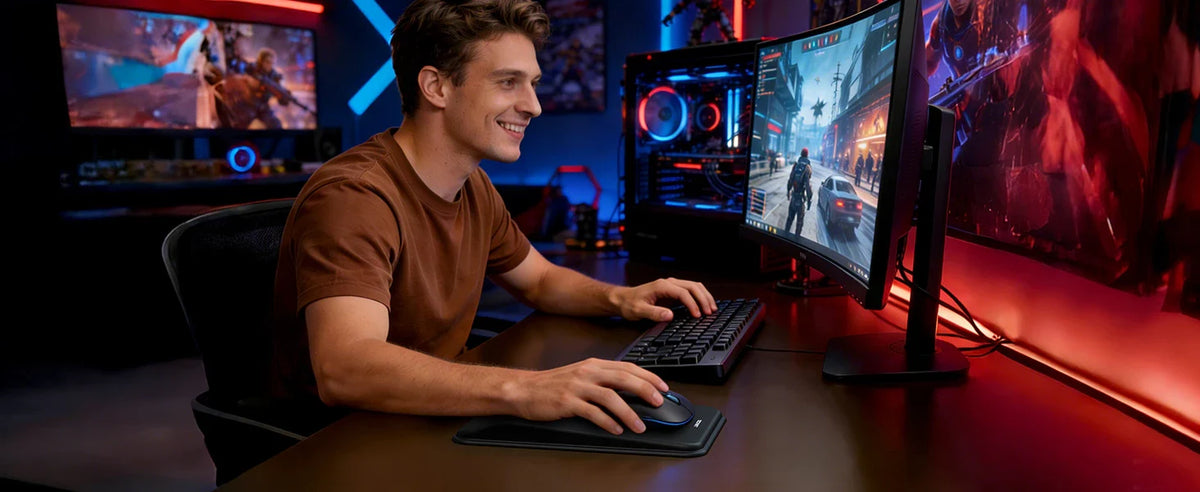
Choosing the right gaming accessories can make your gaming experience more comfortable and enjoyable. Whether you play League of Legends, FPS games, RPGs, or casual PC games, your keyboard, mouse, and headset all play an important role.
But with so many options available, how do you know which gaming keyboard, gaming mouse, or gaming headset is right for you?
The answer depends on the games you play, your preferred control style, your desk space, and your budget. This guide will help you compare essential gaming accessories and find the right combination for your needs.
1. Choose a Gaming Keyboard That Fits Your Play Style
A gaming keyboard is more than just a way to enter commands. Its layout, key response, and overall design can affect how comfortable you feel during long gaming sessions.
Before choosing a keyboard, consider the following factors.
Full-Size vs. 60% Gaming Keyboards
A full-size gaming keyboard provides a complete set of keys, including a number pad and function keys. It's a practical option for gamers who also use their computer for work, school, or everyday tasks.
A 60% gaming keyboard, on the other hand, has a compact layout that takes up less desk space. This leaves more room for mouse movement, which can be helpful for players who use low mouse sensitivity in FPS games.
Which one should you choose?
-
Full-size keyboard: Best for users who want dedicated keys and a familiar layout.
-
60% gaming keyboard: Best for compact desks and gamers who prefer a minimalist setup.
-
Tenkeyless keyboard: A middle ground that removes the number pad while retaining most other keys.
Consider how you use your computer outside gaming before deciding which layout is best for you.
Is an RGB Gaming Keyboard Worth It?
An RGB gaming keyboard can add color and personality to your gaming desk. Backlighting can also make keys easier to see in a dim room, depending on the lighting design.
If you prefer a colorful setup, you might look for an RGB gaming keyboard, a pink gaming keyboard, or a white gaming keyboard to match your other accessories.
For gamers who prefer a full-size layout, the TECKNET RGB Gaming Keyboard with 105 Keys is an option to consider for a gaming or everyday desktop setup.
2. Find a Gaming Mouse That Feels Right
A gaming mouse should feel comfortable in your hand and respond consistently to your movements. The best choice isn't necessarily the mouse with the highest DPI or the most buttons—it's the one that suits your games and preferences.
What Does DPI Mean on a Gaming Mouse?
DPI stands for dots per inch and describes how far the cursor moves in response to physical mouse movement.
A high DPI gaming mouse can move the cursor across the screen with less hand movement. However, higher DPI doesn't automatically mean greater accuracy.
Different games call for different sensitivity preferences:
-
FPS games: Some players prefer lower sensitivity for controlled aiming.
-
MOBA games: Players may prefer settings that allow quick cursor movement between targets and abilities.
-
Strategy games: Higher sensitivity can make it easier to navigate large maps.
The best DPI setting is a matter of personal preference. Try different settings until you find a balance between speed and control.
Wireless vs. Wired Gaming Mouse
A wireless gaming mouse offers more freedom of movement and helps reduce cable clutter on your desk. It's a good option if you prefer a clean setup or want to move your mouse without a cable getting in the way.
A wired gaming mouse avoids the need to recharge a battery and can be a straightforward choice for a permanent desktop setup.
When comparing a wireless gaming mouse with a wired model, consider connection stability, response time, battery life, weight, and comfort—not just the connection type.
The TECKNET Wireless Optical Gaming Mouse is worth exploring if you're looking for a wireless mouse for your gaming setup.
How Many Buttons Do You Need?
A standard gaming mouse may be enough for casual games, while additional side buttons can be useful for games with many commands.
For example, MOBA players can assign certain actions or shortcuts to extra mouse buttons if the game and mouse software support their preferred configuration.
Before choosing a mouse, think about whether you value a simple design, extra controls, or a lightweight feel.
3. Choose a Gaming Headset for Clear Audio and Comfort
A gaming headset can make games more immersive and help you communicate with teammates. When choosing one, pay attention to audio quality, microphone clarity, comfort, and connection type.
What to Look for in a Gaming Headset
Comfortable ear cushions: Soft cushioning and a suitable fit can make long gaming sessions more comfortable.
Clear microphone: If you play multiplayer games, a clear microphone helps teammates understand your callouts.
Useful audio detail: Clear sound can help you notice important in-game effects, dialogue, and environmental cues.
Convenient controls: Easy-to-reach volume and microphone controls can be useful during gameplay.
Suitable connectivity: Choose a wired or wireless headset based on your devices and how you prefer to play.
Wired or Wireless Gaming Headset?
A wired gaming headset is convenient if you usually play at the same desk and don't want to worry about charging.
A wireless gaming headset offers more freedom to move around. However, check compatibility and connection requirements before buying, especially if you plan to switch between a PC, laptop, and console.
You don't need the most expensive headset to enjoy your games. Focus on the features you'll actually use.
4. Which Gaming Accessories Are Best for Different Games?
Different genres place different demands on your equipment. Use your favorite games as a starting point when choosing your accessories.
For League of Legends and Other MOBA Games
MOBA games require frequent clicking, keyboard inputs, and quick movement between targets.
Consider a comfortable gaming keyboard, a mouse that tracks consistently, and a headset with a clear microphone for team communication.
A gaming mouse with additional buttons may also be useful if you prefer assigning shortcuts to your mouse.
For FPS Games
In first-person shooters, mouse control and available desk space can be especially important.
Consider a mouse with adjustable sensitivity, a mouse pad that allows comfortable movement, and a keyboard layout that leaves enough room for your preferred mouse position.
A headset with clear audio can also help you hear game sounds and communicate with teammates.
For RPGs and Casual Games
For RPGs and casual games, comfort and personal preference may matter more than competitive specifications.
A full-size RGB gaming keyboard, a comfortable mouse, and a headset with enjoyable audio can create a setup that works for both gaming and everyday computer use.
5. Should You Buy a Gaming Keyboard and Mouse Combo?
A gaming keyboard and mouse combo can be a convenient choice if you're building your first gaming setup or looking for matching accessories.
You may come across products marketed as a gaming keyboard and mouse combo, a wireless gaming keyboard and mouse combo, or even a gaming keyboard, mouse, and headset combo.
Before purchasing a bundle, check what is included and whether each device meets your needs.
Ask yourself:
-
Does the keyboard have the layout I want?
-
Is the mouse comfortable and responsive?
-
Are the devices wired or wireless?
-
Does the bundle include a headset?
-
Are the accessories compatible with my computer?
A combo can offer convenience, but buying your keyboard, mouse, and headset separately allows you to choose each device based on your own preferences.
6. Build a Gaming Setup Without Overspending
You don't need to buy every accessory at once to create a better gaming experience.
Start with the devices you use most and upgrade them as your needs change.
If your mouse feels uncomfortable: Look for a shape, size, and weight that suit your grip.
If your desk feels crowded: Consider a compact keyboard or a wireless mouse to reduce cable clutter.
If teammates struggle to hear you: Prioritize a headset with a clear microphone.
If your setup looks plain: An RGB gaming keyboard or coordinated accessories can add a personal touch without requiring a complete desk makeover.
When shopping for gaming mouse deals or affordable gaming keyboards, compare features rather than choosing based on price alone. Comfort, reliability, compatibility, and practical functionality are all worth considering.
Frequently Asked Questions
What is the best gaming keyboard for League of Legends?
The best gaming keyboard for League of Legends depends on your preferred layout, key feel, and budget. Choose a layout that makes frequently used keys easy to reach and feels comfortable during extended play.
Is a high DPI gaming mouse better?
Not necessarily. A higher DPI setting makes the cursor move farther with less physical movement, but it doesn't automatically improve accuracy. The ideal setting depends on the game and your preferences.
Is a wireless gaming mouse good for PC gaming?
Yes, a wireless gaming mouse can be a convenient option for PC gaming. Compare connection stability, response time, battery life, and comfort before buying.
Should I choose a 60% or full-size gaming keyboard?
Choose a 60% keyboard if you want to save desk space and prefer a compact layout. Choose a full-size keyboard if you regularly use the number pad or dedicated function keys.
Do I need a gaming headset?
A gaming headset is useful for immersive audio and multiplayer communication, but it's not essential for every player. Consider your gaming habits and whether you need a built-in microphone.
Can I use gaming accessories with a gaming laptop?
Many gaming keyboards, mice, and headsets can be used with gaming laptops, provided their connection types and system requirements are compatible. Check the product specifications before purchasing.
Find the Right Gaming Accessories for You
The right gaming accessories should match your games, your desk, and your preferences—not simply the latest trends.
Start with a keyboard that feels comfortable, a mouse that provides the control you want, and a headset that delivers clear audio and communication.
Explore the TECKNET RGB Gaming Keyboard and TECKNET Wireless Optical Gaming Mouse to find accessories for your gaming setup.

Leave a comment
This site is protected by hCaptcha and the hCaptcha Privacy Policy and Terms of Service apply.